
Why Scanners Are Essential for a Modern Office and How to Choose the Right One
Ever find yourself drowning in a sea of paperwork at the office? Scanners might just be your lifeboat. By digitizing documents, they can streamline processes and reduce clutter—lessons I've learned firsthand after countless trial-and-error moments. A good scanner can redefine productivity, offering efficiency that transforms how your office operates. In this post, we'll delve into essential features to look for, the incredible benefits you'll gain, practical use cases, and even a detailed product comparison. Let's get started.
Scanners 101: Key Features to Consider
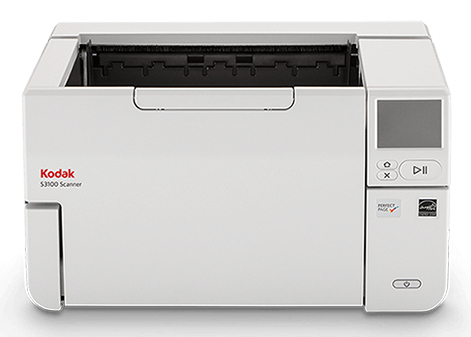
When diving into the world of scanners, there are a few key features that can make a real difference in day-to-day operations. First up is optical resolution, which you’ll often see measured in DPI, or dots per inch. This dictates how crisp and clear your scans will be—a higher DPI like 4800 is typically best for detailed work like photography.
Scan speed is another factor worth your consideration. This is usually measured in pages per minute (PPM), and you'll want something that doesn't keep you waiting, especially in a bustling office. Connectivity options are also crucial. Whether it's a straightforward USB connection or the convenience of Wi-Fi and network capabilities, what you choose should align with your office's existing infrastructure. From my own experiences setting up these devices, I can’t stress enough how vital a good automatic document feeder (ADF) can be. It allows you to scan multi-page documents effortlessly, saving time and sanity. Don’t overlook compatibility with various media, from thick photo paper to legal-sized documents. The importance of seamless integration extends to your office printers, a topic we've covered comprehensively in our discussion about connecting printers effectively. Navigating through these features may seem overwhelming initially, but getting them right can pave the way to a more coherent and efficient workspace.Unveiling the Benefits: Why You Need a Scanner
Let's talk benefits because who doesn't love a good return on investment? Scanners bring a lot to the table, starting with efficient document management. Imagine digitizing your entire filing cabinet, making searching for specific information as simple as a quick search on your computer—a notion that's intrigued many in sectors like healthcare and legal.
Workflows naturally improve too. Processes that used to take days now happen in moments, and, often, I’ve seen team collaboration soar thanks to seamless document sharing. The cost savings are another bonus. With digital storage, you’re not only cutting down on paper expenses but also freeing up office space traditionally filled with filing cabinets. Can a scanner really save you money? In my experience, the answer leans heavily toward yes. Finally, there’s the impact on the environment. By immersing yourself in this digital revolution, you're taking steps toward greener business practices. Less paper use contributes to sustainability—a win-win if you ask me. Digital archiving solutions further help in maintaining this eco-friendly trajectory. With all these perks on the line, the case for adopting a scanner becomes pretty compelling.Choosing the Right Scanner: A Buyer’s Guide
Finding the perfect scanner is often about matching the machine’s capabilities with your specific needs. Are you dealing with high volumes of paper daily, or is your scanning requirement more casual? This initial thought can help you narrow down your options.
Price versus quality is a dance we all do. While premium models offer enticing features, sometimes a mid-range option suffices, particularly if scanning isn’t core to your operations. Ask yourself: 'How do I know which scanner suits my business?’ Identifying your priorities, like space constraints, is pivotal. Integration with your existing tools is another consideration. A scanner that collaborates well with your office printers can save headaches down the line. Drawing on past installations, I’ve learned that compatibility and smooth software support are must-haves. Moreover, always peruse product categories like our scanner collection to ensure you’re making an informed choice. As a quick tip, never underestimate the importance of software support. A seemingly straightforward factor, but it can be your saving grace when setting up a new device.Unlocking the Potential: Practical Applications of Scanners
Scanners have a surprisingly wide range of applications, from archiving historical documents to digitizing entire photo albums. Artists and designers use them for scanning artwork and digital portfolios—talk about bringing creativity into the digital age. In my time working with different creative industries, I’ve seen scanners preserve valuable work with impressive fidelity.
Schools and universities are also jumping on board, scanning research materials for easier student access. However, scanning isn’t without its challenges—like grappling with resolution issues on intricately detailed documents or 3D objects that scanners weren’t exactly meant for. While imagination is encouraged, trying to scan complex items at home might lead to mixed results. To maximize a scanner's utility, consider simple 'Pro Tips'—such as always checking preview scans before the final go-ahead. These tips, much like the right office supplies can transform your workflow, can help you make the most out of your device. Transitioning seamlessly into product comparisons offers insights into how different models stack up against each other.Head-to-Head: Canon CanoScan LiDE 400 vs. Motorola LS2208
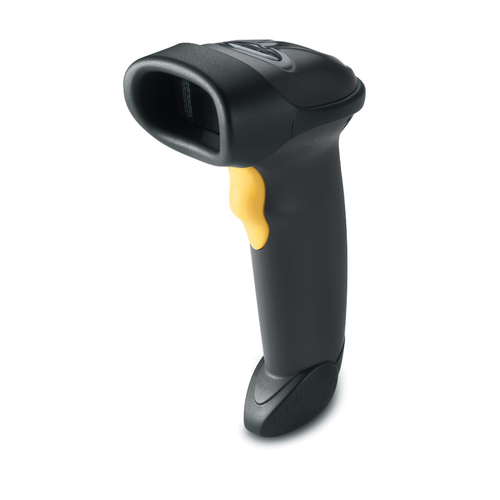
Flatbed or handheld? That’s the question. The Canon CanoScan LiDE 400 is a marvel with its 4800 x 4800 DPI, ideal for those who demand high-quality scans. Think photographers or artists. Meanwhile, the Motorola LS2208 shines in the retail arena with its ergonomic design and swift barcode scanning capabilities. Its working range is versatile, suiting the fast-paced environment where speed is king.
Photographers might lean towards the Canon with its superior detail capacity, whereas businesses in need of quick inventory updates will appreciate the Motorola's efficiency. Discussing integration benefits, ensure your choice seamlessly fits into your current office setup. This is a crucial step, similar to choosing the right business machine for efficiency. Better equipment can make or break productivity, depending on your industry needs.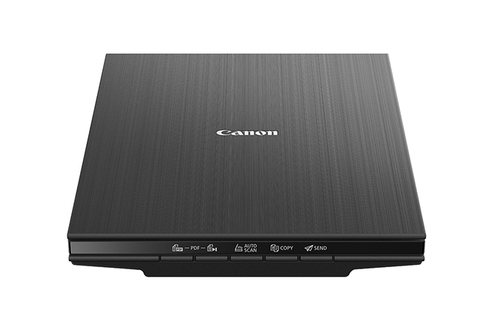
Getting Started: How to Set Up Your Scanner Like a Pro
Let’s dive into the nitty-gritty of setting up your scanner. Start by carefully unboxing the device, ensuring not to miss any critical components like cables or manuals. Next up is the installation of drivers—a step often overlooked. Choose the correct ones for your OS to avoid potential snags.
Connecting to your network or PC should be straightforward, but watch out for common pitfalls like incorrect settings. Also, keep an eye out for OS-specific issues that might arise, especially if you're using older software versions. I learned the hard way: reading the manual can save time. For quick fixes, online forums are invaluable. And remember, it’s entirely okay if the initial setup isn't perfect; problem-solving is part of the process. As for 'Quick Wins,' consider storing scanned projects using cloud solutions for easy access and backup. This tip is particularly useful when dealing with digital transformation in an office setting.Conclusion
Choosing the right scanner is pivotal to meeting your office’s specific needs. Whether you're seeking features like high DPI or robust connectivity options, understanding what each device offers is essential. We’ve explored the multitude of benefits, from boosting productivity to cost efficiency and even environmental perks.
In my own journey, I've discovered how the right equipment can streamline operations and free up time for more valuable tasks. Now, take a moment to consider: 'What could a scanner unlock in your workflow?' Dive into sustainable practices by opting for digital solutions. Your journey begins with that first choice. For those ready to experience the transformation, I invite you to explore our scanner selection on [Scanner], and see how making this choice can truly alter the way your office functions.Frequently Asked Questions
Common questions about Scanner