
Why Choose the HP Designjet Z6dr 44-in Postscript Printer?
The HP Designjet Z6dr 44-in Postscript Printer is a game-changer in the wide format and CAD printing arena. What makes it stand out? Dynamic security and a unique double roll feature keep it ahead in the large format printer landscape. This article is for anyone in need of reliable printer repair or high-quality CAD printing services. Read on to explore its incredible benefits and practical applications that set it apart from competitors.
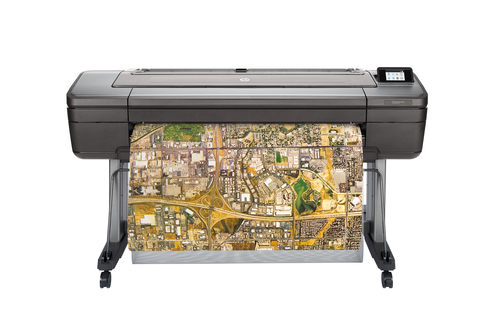
Dynamic Security: Keeping Your Printer Secure
In today’s printing landscape, security is as crucial as print quality. HP's dynamic security measures in the Designjet Z6dr illustrate just that. This technology communicates effectively with HP chips, even when they're reused, enhancing compatibility and reducing risks posed by non-HP components.
The inclusion of regular firmware updates maintains both security and performance levels, safeguarding your investment. Firmware aids in keeping operations smooth—much like updating an app on your smartphone makes it more efficient and secure. For industries reliant on sensitive data, like blueprint printing, consistent quality is non-negotiable. The dynamic security of the Z6dr doesn't just protect hardware but ensures each print is up to par, promising fewer headaches when handling important designs. Protecting your printing assets isn't merely about maintaining quality; it's a proactive step against unnecessary technical hiccups.Unmatched Printing Capabilities
The printing prowess of the HP Designjet Z6dr is genuinely impressive. Utilizing thermal inkjet technology, it achieves a high resolution of 2400 x 1200 DPI, making it perfect for CAD projects requiring pinpoint accuracy. The fidelity it offers means even the smallest lines in technical drawings are rendered precisely.
With a spectrum of colors available, including cyan, photo black, matte black, magenta, and yellow, the Z6dr captivates with vivid and precise imagery. Its color capabilities rival well-known brands; in fact, compared to competitors like the Epson SureColor and Canon imagePROGRAF, the Z6dr often leads in terms of color accuracy and paper handling—a crucial factor in industries where minute details matter. Often, the difference is not just in the specs but in practical application. Artists needing vibrant reproductions and architects seeking detailed blueprints will find this machine invaluable. Meanwhile, other machines might struggle with such demands—each feature is designed with exacting needs in mind.Seamless Connectivity for Stress-Free Printing
Connectivity can make or break your printing workflow, and the HP Designjet Z6dr excels here. Equipped with USB and Ethernet LAN ports, integrating this printer into any office network is straightforward. Always-on solutions are made simple, transforming your workspace into a hub of productivity.
For environments where same-day outputs are a must, reliable connectivity is non-negotiable. Sometimes, offices have multiple users vying for printer time. Reliable connectivity ensures everyone can access high-quality printing services seamlessly. On the product details page, you'll notice the Z6dr's ease of integration sets it apart from the pack. Integration might sound technical, but it's as easy as plugging it in and letting these smart configurations do the rest—making it a go-to for those less inclined towards technical setups. In my experience, such ease of use removes barriers that usually frustrate busy office teams, ensuring that print-related stress becomes a thing of the past.Advanced Trimming and Handling Features
Time is of the essence in printing, and the Z6dr is designed to handle it with ease through advanced features. Take the V-Trimmer and double roll capabilities, for instance; these features streamline media handling and reduce waste. When meeting tight deadlines, these enhancements can become your best ally.
Such features are invaluable in CAD services and plotter printing, where precision and speed are paramount. Imagine going from one print task to the next without having to manually adjust rolls—a significant time saver! Real-world application might include architectural firms racing against the clock or designers fine-tuning large-scale graphics. These capabilities position the Z6dr as a preferred option for those looking to stay competitive in industries that require precise large-format prints. And, let’s face it, in a fast-paced setting, having one less thing to worry about means you can focus more on creating jaw-dropping visuals.A Balanced Review of the HP Designjet Z6dr
So, what’s the verdict on the HP Designjet Z6dr? Pros abound: it offers top-notch color accuracy, boasts a robust security framework, and handles media with versatility. Yet, like every tech product, it has its quirks—maintaining reliance on HP firmware and potentially higher cartridge costs, for instance, might deter some.
In real-world scenarios, this printer excels in detailed CAD work and vibrant poster printing, proving to be a powerful asset in artistic and technical fields alike. If you're an architect or a designer, the Z6dr can greatly enhance your workflow. Though, for offices needing something more straightforward, perhaps a more budget-friendly model could suffice, depending on your primary requirements. However, for serious printing tasks, particularly those involving complex designs, the Z6dr typically is worth the investment.How to Get Started with Your HP Designjet Z6dr
Getting your HP Designjet Z6dr up and running is straightforward with this guide. Start by carefully unboxing your device. It's crucial to follow the provided instructions to avoid any mishaps. Once unboxed, ensure you've connected the printer using USB or Ethernet for seamless integration.
Installing the necessary drivers is the next step. Visit the product details page to download the latest versions and follow the guided installation process. Conducting initial test prints helps in calibrating and confirming optimal performance. Don’t skip this as it lays the foundation for future quality. Routine maintenance, such as updating firmware regularly and keeping your printer dust-free, is equally important. And should you encounter connection issues, consider the USB port as a fallback for troubleshooting—it works like a charm! In the fast-paced world of printing, taking these steps ensures longevity and high-quality output, keeping your creative processes efficient and reliable.Conclusion
Summarizing the HP Designjet Z6dr narrative, it’s clear why this printer stands out—it combines cutting-edge printing capabilities with dynamic security and user-friendly connectivity. An asset for businesses and enthusiasts involved in large format printing or CAD services, the Z6dr provides value far beyond its hardware.
For those on the brink of a purchasing decision, weighing the features against the value it adds is crucial. Knowing your investment aligns with your professional needs can be comforting. If this review piques your curiosity, I recommend checking the product details page for more information. Consider this printer as a reliable, long-term companion on your creative journey—offering quality and efficiency that might just redefine your printing expectations.Frequently Asked Questions
Common questions about HP Designjet Z6dr 44-in Postscript Printer with V-Trimmer - TAA - Double Roll Only