
Are You Using the Right Cable for Your Printer?
Printer cables, often overshadowed by more prominent components, are crucial for achieving consistent connectivity and superior print quality. Think of them as the unsung heroes that, when chosen correctly, enable your printer to perform at its peak. In this post, we'll explore the types of printer cables, their specifications, and the profound impact they can have on boosting productivity and enhancing your printing experience.
Understanding Different Types of Printer Cables
Printer cables come in various types, each with its unique functions and use cases. From parallel cables, predominantly used with older printers, to USB cables that cater to most modern printers, the selection is vast.
Parallel cables, known for their robustness, are generally used in commercial environments requiring consistent performance across longer distances. They excel in settings where data integrity is vital. Meanwhile, USB cables are the gold standard for personal and office use, delivering high data transfer speeds and easy connectivity options. The specifications of these cables matter significantly. Length can affect signal strength—longer cables might lose data along the way. And let's not overlook compatibility; not all cables are universal fits, so it's important to match them with your device's ports. For instance, USB 2.0 might not fully support the speed a USB 3.0 printer offers. Each cable type influences performance differently. A parallel cable might excel in older setups but lack the speed of a USB in modern applications. Understanding these variances can save you from connectivity headaches down the line. Explore more about compatible printer types and cables in our printer selection guide.The Benefits of Choosing the Right Printer Cable
Choosing the right printer cable doesn't just mean avoiding potential headaches—it also maximizes the performance of your device. A well-matched cable can significantly enhance print speed, ensuring you don't wait endlessly for that important document.
Reliability is another critical benefit. Good quality cables are less likely to suffer from intermittent disconnections, which can be frustrating in both home and business setups. In my experience, investing in the right cable initially can prevent long-term issues with printing errors and connection failures. Another often-overlooked benefit is that the right cable can extend your printer's life. By providing a stable connection, you're ensuring that the printer operates smoothly, reducing wear and tear. On a personal note, I recall troubleshooting printer issues for hours, only to find the culprit was a subpar cable. Avoiding such experiences underscores the importance of choosing wisely. For anyone frequently encountering printer problems, checking the cable should be step one. To help diagnose such issues, consider exploring our troubleshooting guide to improve your setup's efficiency.Use Cases: Matching Cables to Printer Needs
Getting the right printer cable is often dependent on the environment in which it's used. For a home office setup, a simple USB cable usually does the job, given its balance of speed and convenience. It's ideal for everyday printing tasks, where speed might not be the highest priority.
However, industrial settings, where volume and speed are critical, might still rely on parallel cables or even more specialized connections. These environments benefit from cables that handle high data throughput without sacrificing consistency. On the other hand, I've seen office setups where simply switching to a better-quality USB cable improved productivity and morale—a small change with a big payoff. Misalignments in cable choice—like using a low-speed USB in a high-demand environment—can bottleneck the efficiency, often frustrating those involved. That's why understanding your printer's requirements and matching them with the right cable is key. If you're setting up a workspace, don't underestimate this detail. For more tailored advice on selecting the right setup, check out our guide on choosing office equipment.Common Mistakes in Printer Cable Selection
What's the biggest slip-up when choosing printer cables? Many underestimate the importance of cable length, leading to purchases that either can't reach or are unnecessarily long.
Overvaluing price over quality is another pitfall—while a cheap cable might seem like a good deal, it often doesn't last, leading to frequent replacements and headaches. In my opinion, investing a little more upfront prevents hassles later on. Another common mistake is not thoroughly checking compatibility. Not every cable fits every printer, even if the connectors fit. For example, a higher-speed printer might not perform optimally if paired with an older standard cable. Anecdotally, I've seen many who skip over this due diligence only to struggle with unexplained disconnections and printing errors. My advice? Always read the specifications and, when in doubt, consult with the manufacturer or vendor directly. By doing so, you'll avoid the most common pitfalls. If you're interested in more practical advice, consider diving into our in-depth selection tips.Comparing Two Popular Printer Cables
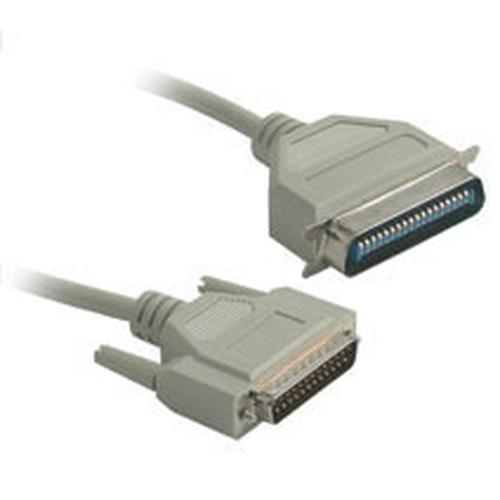
When choosing between the C2G DB25M to C36M Parallel Printer Cable and the Micropac USB 2.0 Cable, it's crucial to consider their features. The C2G cable, longer and robust, is tailored for older devices needing consistent data transfer over longer distances. Its parallel nature makes it perfect for dot-matrix printers, often used in industrial settings.
On the other hand, the Micropac USB is about speed and modernity—offering seamless connections for USB-supported printers, ensuring rapid data transfers. While the C2G cable excels in durability and compatibility with legacy systems, the Micropac USB brings speed and versatility for home and office users. By understanding what your printer truly demands, selecting either becomes a breeze. Both are reliable, but their optimal usage scenarios vary, making them great fits for distinct setups.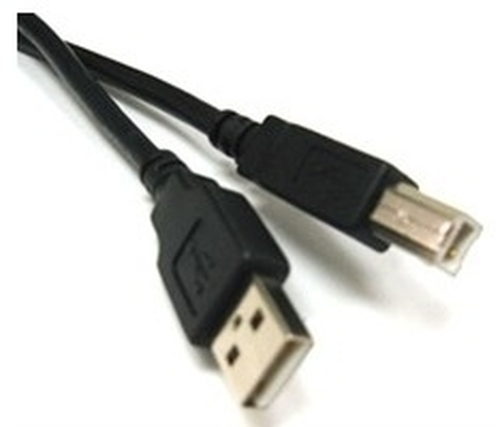
How to Choose the Right Printer Cable
Deciding on the right printer cable is simpler than it seems when you consider a few key factors. Start by assessing your printer's compatibility; consult the manual or manufacturer's website to determine the required cable type.
Next, consider your printing needs—whether speed or reliability is prioritized. For instance, USB cables suit most modern printers, offering quick data transfer rates, whereas parallel cables might be preferable for older models or specific environments. Evaluating cable quality also matters. Look for well-reviewed brands and models that promise durability (often with reinforced connectors) and verified performance. And remember, environment plays a role too. Ensure the cable length suits your setup without straining connections—a common mistake. Moreover, factor in what your printer is typically used for; higher-end printers might require cables that support greater data throughput to maximize their capabilities. For specific recommendations tailored to various printer types, explore our product selection section and make an informed choice.Conclusion
In conclusion, the right printer cable is key to enhancing your overall printing experience and productivity at both home and office. Thoughtfully choosing a cable tailored to your device's needs can prevent future connectivity issues and ensure optimal performance.
Remember that investing in a suitable cable is a cost-effective way to extend the life of your printer and improve print quality. So next time you upgrade your printer setup, don't overlook the humble cable; it might be the small change that makes a big difference. As you navigate your options, consider the finer details, such as length, compatibility, and intended use. This investment in quality and compatibility can save you time and resources in the future. To make the most informed and effective choice, please explore our comprehensive range of options in the printer cables section.Frequently Asked Questions
Common questions about Cables