
Is the HP Designjet Z6dr 44-in Printer Your Best Choice for Wide Format Printing?
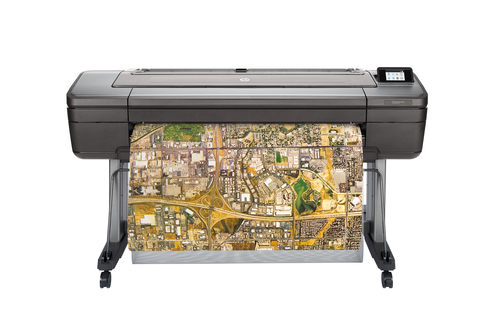
In fields like architecture and design, the need for precision in wide format printing is undeniable. Enter the HP Designjet Z6dr, a printer distinguished by its V-Trimmer and dynamic security features. This blog delves into what makes this model a game-changer in performance, features, and overall value. Join us on a journey to see if this printer aligns with your requirements, with insights and tips along the way. Discover more about the versatility of HP Designjet Z6dr.
Unpacking Dynamic Security: Why It Matters
Dynamic security in printing essentially ensures that your printer uses only authentic parts—like HP cartridges—with an aim to offer the best functionality, longevity, and quality. The HP Designjet Z6dr is engineered with this in mind, allowing just HP’s cartridges to mesh with its intricate mechanisms, a move that ensures top-notch performance for every print task. Moreover, you won't have the hassle of sub-par third-party cartridges cluttering up the system, preventing potential damage.
The implications for managing print supplies are clear—simplified inventory and better efficiency. Yet, there's a flip side for those who prefer using third-party options; the Designjet Z6dr effectively locks these out. Think of this security measure akin to how high-end tech brands maintain their device ecosystems—maximizing reliability while potentially limiting third-party freedom. Regular updates from HP serve as a guardrail, safeguarding performance and enhancing capabilities over time. This isn't just about security; it's a nod to evolving tech trends where cybersecurity plays a key role across devices. Dive deeper into HP's measures in dynamic security for more context.Superior Printing Capabilities for Creative Minds
Imagine the crispness of 2400 x 1200 DPI color precision delivered through the HP Designjet Z6dr’s thermal inkjet technology. With a vibrant range of colors including Cyan, Photo black, Matte black, Magenta, and Yellow, this printer is a boon for CAD services and blueprint projects. Professionals in these fields know that meticulous color detailing—often elusive in large formats—becomes a norm with this machine.
Additionally, the Z6dr accommodates diverse project scales effortlessly, thanks to its wide format sizes, which means it’s just as adept at producing small yet intricate plans as it is at crafting expansive visual displays. From a cost perspective, the efficiencies gained in terms of reduced waste and fewer errors contribute significantly to its appeal. When pondering advanced printing technology, this model stakes a definitive claim in value for professional settings. Often, it's the subtle improvements like faster printing speeds and reduced ink usage that make a noticeable difference in day-to-day operations. This machine can redefine what you expect from a wide-format printer.Connectivity and Efficiency: More Than Just a Printer
In a world where seamlessness is king, the HP Designjet Z6dr doesn’t disappoint with its robust connectivity features. With Ethernet LAN and USB port options, integration into your existing network is a breeze, enhancing the workflow dynamics in bustling office environments. Imagine a day where you can quickly set up and hit print without a hitch—ideal for same-day print needs where expediency is critical.
Consider the real-world scenarios; a project lands on your desk and within moments, you're ready to output high-quality documents without a second thought. That’s where the efficiency of the Z6dr stands out. Beyond connectivity, this printer supports sustainability goals due to its energy-efficient operations. In an era where eco-conscious decisions matter, having a machine that balances performance with environmental mindfulness is a double win. Embrace its versatility by exploring real-world applications that highlight its extensive utility. The Designjet Z6dr elevates what's expected from a printer, serving as a beacon of modern office solutions.Ease of Use Meets Cutting-Edge Technology
User-friendliness is often a highlight where technology intertwines with everyday use, and the HP Designjet Z6dr excels here. Its intuitive interface makes operation straightforward, even for those who aren’t tech-savvy. The V-Trimmer adds another layer, enabling precise and customizable cuts—a godsend for print professionals seeking meticulous results.
Real-world feedback reveals that professionals enthuse over this precision, where complex tasks become simplified chores. And, there’s an environmentally friendly upside too—accurate trims mean reduced material waste, which is a perk worth noting. When stacked against alternatives like the Epson SureColor, the Z6dr holds its own, particularly for those who prioritize ease alongside advanced functionality. Insights and setup tips for optimal performance can further streamline your experience, helping maximize every print session. Who says high-tech gadgets need to be complicated?HP Designjet Z6dr in the Real World: A Comprehensive Review
In reviewing the HP Designjet Z6dr, what stands out is its exceptional blend of precision, security, and connectivity—a trifecta that caters beautifully to demanding professional environments. Pros include its excellent color precision and robust dynamic security—ensuring each print job is up to scratch. Yet, no piece of tech is perfect, right? The cartridge compatibility might be restrictive for some, coupled with potential upfront costs that could be a hurdle for budget-conscious users.
Picture this printer in action at an architecture firm or design studio; its seamless operations for high-volume tasks commend it to such settings. The Z6dr's balance of features versus price places it firmly in the premium tier, inviting those who value quality and security to make an informed choice. For all these reasons, it might just be the investment your business needs, though exploring alternatives if budget constraints exist is prudent. It’s the quintessential debate of quality over cost.Getting Started: How to Optimize Your Printing Experience
Setting up your HP Designjet Z6dr is a straightforward process with certain steps ensuring you hit the ground running. Begin with connecting the printer using either the USB or Ethernet options. It’s crucial to stay on top of firmware updates; they uphold the dynamic security measures, maintaining efficient operation. When installing cartridges, ensure they’re loaded with HP-approved chips to avoid any compatibility snags.
For those taking on large formats, optimizing print quality is essential; in my experience, adjusting DPI settings relative to your specific needs often yields the best results. Common setup pitfalls include hastening through the alignment processes or skipping crucial calibration steps—don't cut corners there. Adhering to these procedures ensures you’re prepared for seamless operations from the outset. Think of this as your pathway to replicating professional outcomes consistently.Conclusion
Reflecting on the HP Designjet Z6dr, it’s evident that its advanced security capabilities, paired with superb color precision and varied connectivity options, position it as a formidable option in industries like architecture, design, and engineering. This printer aligns well with current needs by offering technology that meets modern printing demands while adhering to market trends.
Whether it's the premium quality or the specialized functionalities you seek, weighing these features against your specific needs will guide an informed decision. Typically, for those who prize high-quality outputs and security assurances, the Z6dr is an attractive proposition. However, given its premium nature, it's wise to explore comprehensive insights with further blog insights to finalize your choice. Your next big print decision might just start here—explore and decide thoughtfully.Frequently Asked Questions
Common questions about HP Designjet Z6dr 44-in PostScript Printer with V-Trimmer TAA Compliant