
Is the HP Designjet T250 24-in Printer 2025 Edition Right for Your Printing Needs?
The HP Designjet T250 24-in Printer 2025 Edition stands as a remarkable choice in wide-format printing, offering dynamic security features and seamless integration with HP cartridges. Whether you're handling complex blueprints or large artistic projects, this printer's connectivity options—USB, Ethernet LAN, and Wi-Fi—ensure versatility and ease of use. It caters to diverse needs, making it an ideal partner for businesses looking for high-quality and reliable printing solutions.
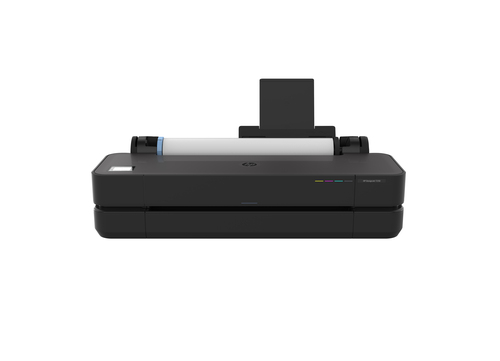
Key Features of the HP Designjet T250
The HP Designjet T250 is engineered with precision, integrating advanced thermal inkjet technology to deliver outstanding print quality with resolutions up to 2400 x 1200 DPI in color. With the ability to handle black, cyan, magenta, and yellow cartridges, the printer provides vibrant and precise outputs. Importantly, the dynamic security feature ensures the printer functions optimally only with HP chips, enhancing performance and protecting against potential security threats.
The sophistication of these features is not just for show—it significantly impacts specialized fields like CAD printing services. Keeping your wide format printer's firmware updated is crucial, and the T250 makes this seamless, with updates designed to safeguard both usability and data security. The synergy between these components means you're not just getting a printer, but a reliable tool for maintaining top-tier results in your projects.If you're involved in printing large and intricate designs or architectural plans, you'll appreciate how these features translate into smoother operations and less downtime. The T250 brings a level of operational reliability that can often be taken for granted, ensuring that your focus remains on delivering quality results rather than managing printer malfunctions. Explore more about the technical specifications that make this model a standout in its category.The Benefits and Value Proposition
When it comes to wide-format printing, efficiency is key, and the HP Designjet T250 delivers just that. Its precision and ease of use translate into tangible benefits, particularly for businesses requiring consistent and high-quality outputs. The printer’s dynamic security measures meet the demands for reliability, ensuring that each print run is as flawless as the last, a necessity for industries that rely on precision, like CAD and blueprints.
Beyond technical prowess, what often surprises users is how cost-effective the T250 is compared to alternatives like the Epson SureColor or Canon imagePROGRAF. While those brands offer excellent quality, the T250's balance of features and economy positions it as a viable choice for businesses watching their bottom line. This printer is always ready to meet the demands of frequent printing, providing an impressive return on investment.For smaller firms, its user-friendly interface and low maintenance elevate its appeal, making it accessible even to those less technically inclined. Meanwhile, the robust design and reliable performance save time and resources that are typically spent on servicing and troubleshooting. This practical approach often wins over businesses that previously considered premium models imperative—but found value in a more balanced solution.Real-World Applications and Use Cases
In practical settings, the HP Designjet T250 finds its place across various industries—each benefiting from its specific strengths. Take architectural firms, for example. They often require precise blueprint outputs, and the T250 delivers with exacting detail that ensures no part of their intricate designs is lost. Likewise, advertising agencies reap the benefits of its vibrant color capabilities, producing large posters that retain their intended appeal.
Engineering departments, too, turn to the T250 for its dependable performance. Whether it’s printing technical drawings or complex designs, the accuracy of the T250 ensures specifications are met. Real-world users often share stories of how the printer’s reliability has dramatically reduced workflow disruptions, providing worth far beyond its initial cost. For a team used to premium devices like the DesignJet T850, transitioning to the T250 can mean fewer compromises while maintaining quality.It’s vital, however, to recognize scenarios where its features truly shine. Art studios, for example, value the T250 when managing large printing projects that require both detail and vivid colors. While the T250 may not replace higher-end models in every situation, its balanced blend of features and value ensures it remains an integral part of many professional settings.Connectivity and Integration in Modern Workspaces
Modern businesses thrive on connectivity, and the HP Designjet T250 meets these needs with multiple options: USB, Ethernet LAN, and Wi-Fi. These allow seamless integration into tech-savvy workspaces where speed and accessibility are crucial. Your printer's wide format capabilities are only as effective as the ease with which you can access them, and the T250's versatile connectivity ensures it stays at the forefront of efficiency.
Integration with existing systems is smooth, minimizing the learning curve and promoting quick adoption in busy environments. Its compatibility with popular CAD systems is particularly noteworthy, aligning perfectly with workflows that demand precise technical drawings. The capacity to swiftly switch between printing mediums without extra setup is a time-saver in many business models.Businesses appreciate not just the availability of these features, but their reliable performance under varying conditions. The T250's ability to seamlessly merge into current setups offers peace of mind, allowing teams to focus efforts on their core objectives, rather than the intricacies of a new printer. This effortless integration, combined with its robust support system ensures that the T250 is a sound investment in the long run.HP Designjet T250: A Balanced Review
Evaluating the HP Designjet T250 typically reveals standout qualities like its ease of use and consistent print quality. Users often praise its high-resolution outputs and robust security features, which collectively offer peace of mind over extended use. However, some potential drawbacks arise, mainly the reliance on HP cartridges due to the dynamic security setting—something that can occasionally create frustration.
Nevertheless, typical feedback highlights satisfaction with the T250’s performance, especially in settings demanding reliability such as architectural and engineering firms. While some might miss features found in premium models, it's the versatility and straightforward operation that appeals to many. Despite its intricacies, the balance of benefits that the T250 offers aligns well with a wide range of professional needs.In my experience, for those seeking an intermediate solution that balances cost and functionality, the T250 is often the right fit. Its design fulfills essential roles without overwhelming users with unnecessary complexity. Therefore, while it isn't the top choice for everyone, it provides a compelling combination of features for those prioritizing efficiency and cost-effectiveness.Getting Started with the HP Designjet T250
Setting up the HP Designjet T250 is straightforward, starting with carefully unboxing the unit to ensure all components are present. Begin by securely loading the printer cartridges, a step where proper alignment can often be missed. Connecting the printer through Ethernet or Wi-Fi is intuitive; just follow the prompts on the screen for a seamless connection.S
Configuring your settings for large format prints involves selecting the appropriate options in the printer's interface—taking care to adjust the DPI settings to match your preference for print quality. It's a good idea to run a test print to confirm all configurations are accurate before beginning larger projects.Maintaining the T250 in a busy environment means regular checks on ink levels and cleaning cycles to prevent clogs. Be proactive about firmware updates to benefit from the latest features and security updates provided by HP. Common startup troubles typically involve connectivity issues; double-checking network settings is a handy fix. With these steps, your T250 will provide reliable service, allowing you more time to focus on critical printing tasks.Conclusion
Overall, the HP Designjet T250 emerges as a dynamic choice for those in need of reliable wide-format printing. Its dynamic security and efficient performance stand out, ensuring it meets a variety of professional requirements with ease. However, for businesses heavily reliant on alternative brand supplies, its HP-only cartridge usage may pose a limitation.
In my view, businesses prioritizing precision and reliability in their printing tasks will find the T250 a worthy investment. Its capacity to deliver consistent, high-quality prints is matched by a user-friendly design and moderate maintenance needs. With a balanced value proposition, it's a strong contender among its peers.Ultimately, deciding whether to invest in this model should center on your specific printing needs and operational goals. Is your priority reliability and efficiency? If yes, the T250 is undoubtedly a solid candidate to consider. Visit our product details page to learn more and explore purchasing options.Frequently Asked Questions
Common questions about HP Designjet T250 24-in Printer 2025 Edition