Is an Ink-Jet Printer the Right Fit for Your Needs?
In the hustle and bustle of our modern world, ink-jet printers stand as vital tools for both personal and professional printing tasks. They offer a versatile bridge between affordability and high-quality output, ideal for a range of environments. Whether you're equipping a home office or managing business documents, understanding their unique features and benefits can help you decide if they’re right for you. Let's delve into their capabilities to see what fits your needs.
The Core Features of Ink-Jet Printers
Ink-jet printers are fascinating beasts in the tech world. At their core is the print head technology, with precise nozzles that spray tiny droplets of ink onto paper. This is where DPI—dots per inch—comes to play, defining the crispness and clarity of your printed image. Typically, higher DPI means better resolution, so you get sharper pictures. Then, there's color reproduction, which is crucial for vibrant images, even for intricate blueprint printing. The more sophisticated models boast wide format printing, ideal for larger projects.
And while we're on it, remember that these printers can cater to diverse needs. Whether you're a hobbyist looking to bring your creative visions to life or a professional requiring detailed graphics, there's an ink-jet out there for you. Also, consider the nozzle count—more nozzles often translate to faster printing without sacrificing quality. If you're curious, check out our category page for more in-depth explorations of these specs. It's all about finding that sweet spot between technical capacity and your unique needs.Why Choose Ink-Jet for Personal and Professional Use?
When considering a printer, ink-jet models provide a compelling blend of benefits. Firstly, they're often more affordable than laser printers, making them a budget-friendly option for homes and small offices. Their compact size also suits varied spaces, from small study nooks to bustling work environments. In terms of print speed, while they might not match lasers for sheer volume, they handle moderate tasks efficiently.
Meanwhile, their adaptability for CAD printing services stands out, especially for businesses dealing with design and architecture. For eco-conscious users, many manufacturers now offer eco-friendly ink options—usually in bulk packaging—reducing waste and cost. Brands like MyCadPrinting highlight this movement, encouraging more sustainable choices. On the whole, the value proposition here is hard to ignore. In my experience, for those who don’t need to print enormous volumes daily but demand top-notch quality, ink-jet printers often hit the mark. That said, assessing your specific requirements will guide you to the right model, possibly helping your penny go farther without compromising on the essentials.Unpacking Common Use Cases for Ink-Jet Printers
Ink-jet printers have made significant inroads into various sectors, thanks to their versatility. In educational settings, they assist teachers by providing crisp handouts and materials that aid learning—nothing beats a well-presented project. Meanwhile, they shine in small-scale photo printing, an area where color accuracy and detail are paramount. That's where their ability to seamlessly integrate with scanner sales systems often comes into play, making them a flexible choice.
Now, let's venture into creative realms. Ever tried using an ink-jet for wide format printing? These scenarios are perfect for design students and artists working on ambitious projects. My cousin, who is an art teacher, swears by them for student exhibitions. Moreover, they also fit into more mundane tasks like daily office chores, where reliability and quality are key. Looking for more ideas on applications? Visit the category page for deeper insights. Ultimately, the appeal of ink-jet printers is their ability to meet a broad spectrum of printing needs, serving as trusty companions in many a journey.Exploring Advanced Printing Technologies in Ink-Jet Models
Technology has given ink-jet printers a significant facelift. Many models now support wireless connectivity, letting you print from anywhere in the room—perhaps even from the other side of the house. And with multifunction capabilities, they aren't just printers; they’re scanners and copiers packed into one sleek unit. The integration with digital tools like tablets and smartphones amplifies their utility, making on-the-go printing a breeze. For those hard-pressed for time, devices like the Canon imagePROGRAF cater to same-day printing needs, ensuring efficiency.
Believe it or not, even with such advanced features, troubleshooting is less of a headache. Whether we talk about compatibility with various digital ecosystems or ease of plotter repairs, the industry has streamlined maintenance processes significantly. Plus, innovation in user interfaces ensures that operating these printers is simple and intuitive, even for tech novices. With continual updates and model releases, keeping an eye on current trends and understanding your specific use will keep you ahead, simplifying life in more ways than one.HP DesignJet T850 vs. Brother MFC-J6540DW: Which Suits You Best?
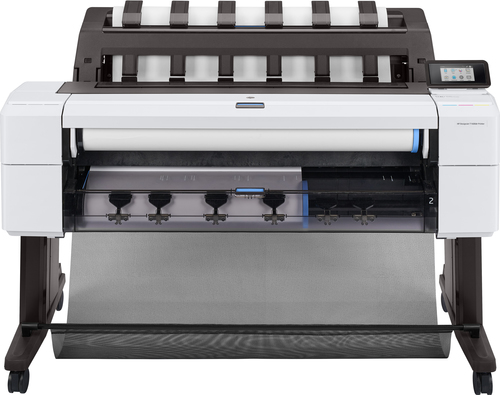
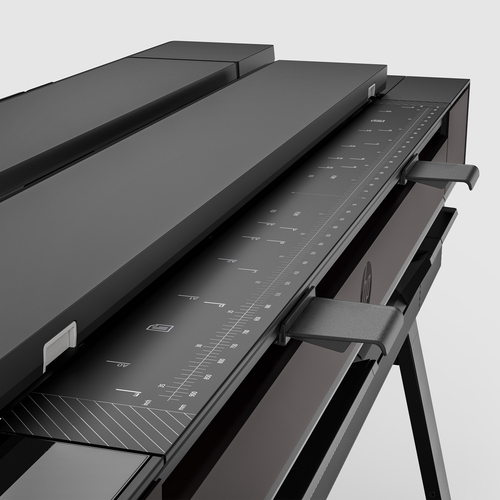
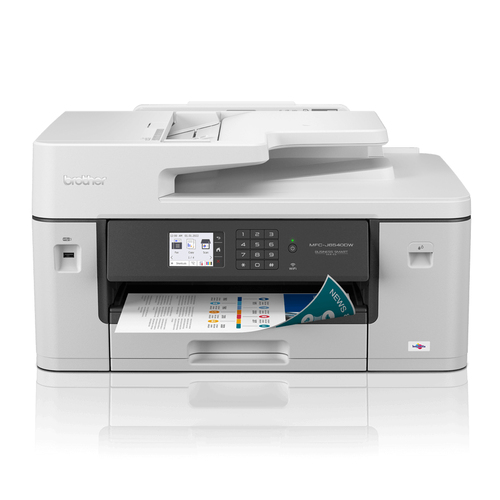
Deciding between the HP DesignJet T850 and the Brother MFC-J6540DW depends largely on your needs. The HP DesignJet T850 excels in printing large format blueprints and detailed graphics, perfect for professionals in architecture and design. It’s a powerhouse designed for high-quality, big-scale work. In comparison, the Brother MFC-J6540DW is more of an all-rounder. It offers robust support for A3 paper and delivers high DPI output that meets the demands of both high-resolution prints and day-to-day tasks. In my view, if your focus is on large format detail, the HP might be worth the investment. But if flexibility and adaptability across various tasks are crucial, consider the Brother.
Getting Started with Your Ink-Jet Printer: A Quick Guide
Setting up an ink-jet printer is often straightforward but can sometimes trip up first-timers. Start by carefully unpacking the device, ensuring all components are present and accounted for. Next, install the ink cartridges; they usually snap right into place. Then, connect the printer to your Wi-Fi network—most models have simple, step-by-step instructions on display.
Don't skip setting up user profiles. They help manage tasks and streamline the printing process. Moreover, maintaining print quality involves regular cleaning routines, like checking the print heads and clearing any debris. If paper jams or connectivity issues arise, don’t panic. These are common occurrences—usually fixed by reloading the paper tray or rebooting your router. Keeping the user manual handy can be invaluable, offering troubleshooting tips and guidance for persistent problems.Conclusion
Throughout our discussion, it’s clear that ink-jet printers provide exceptional value in diverse settings, bridging the gap between everyday tasks and specialized projects. They offer a unique blend of features, cost-effectiveness, and versatility that caters to varying demands—from straightforward document printing to more complex wide format printer maintenance. In deciding if an ink-jet is right for your needs, factor in what matters most: print quality, speed, eco-friendliness, or innovation. While no single model suits every scenario, the right choice can enhance efficiency, support creativity, and even save money in the long run. Explore different models today, and uncover how they can revolutionize your printing processes. For further exploration or purchasing options, feel free to browse through our category page.
Frequently Asked Questions
Common questions about Ink-jet