
Why the HP Designjet T250 24-in Printer is a Game-Changer for Your Printing Needs
The HP Designjet T250 24-in Printer is a versatile powerhouse that meets both professional and personal wide format printing needs. With features designed to boost productivity and quality, it’s ideal for blueprint and creative projects alike. Especially impressive is its dynamic security, which optimizes cartridge performance. Curious about how this printer can enhance your workflow? Discover more benefits by exploring this link and consider the potential improvements it might bring to your projects.
Delving into the Main Features
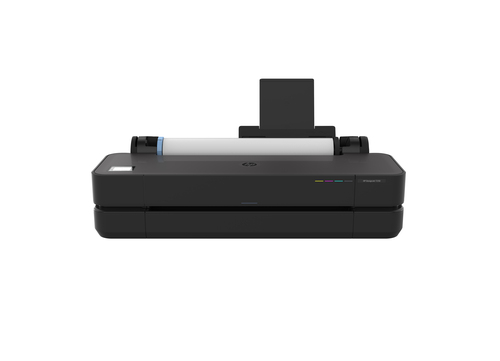
The HP Designjet T250 impresses with its core features, starting with its thermal inkjet technology that promises precision and quality. Its ability to produce 2400 x 1200 DPI color prints is crucial when tackling detail-intensive tasks like CAD projects. Not to mention, the vibrant color palette—Black, Cyan, Magenta, and Yellow—supports a wide range of applications. Connectivity options are top-notch, offering USB, Ethernet LAN, and Wi-Fi. This means integrating the T250 into a modern workspace is a breeze, whether for home use or at an office. Using HP-certified supplies is another key factor, as it ensures optimum functionality—plus, it complements the dynamic security measures that guard against unauthorized cartridges.
When it comes to technological integration, the printer is truly a 'plug and play'. You won't need to be a tech wizard to get it connected and printing. It's clear that HP's thoughtful design prioritizes user experience without compromising on essentials. The Designjet T250 is more than a printer; it's a valuable piece of tech that melds seamlessly into your workspace, making wide format printing not just possible but pleasurable. Learn more about the product details to see how these features could work for you.Benefits and Value Proposition
The HP Designjet T250 certainly shines as a cost-effective printing solution, not only for large businesses but also for individual professionals seeking quality and economy. Imagine the convenience of same-day printing without sacrificing print quality. The T250 delivers vivid, high-resolution prints perfect for presentations or finely detailed architectural drawings. An ideal tool for turning concepts into reality, whether you're part of an organization like Mycadprinting or a consistent printer user needing reliability.
Many users praise its efficiency and the solid reputation of HP products over competitors such as Epson SureColor and Canon imagePROGRAF. Trust is something that's earned over decades, and HP certainly has it in spades. Additionally, the T250 doesn't just save costs on prints; it saves precious time for businesses. This reliability means less time worrying about maintenance or malfunctions and more time focusing on core tasks. It’s these qualities that make it a standout choice for those who value efficiency and effectiveness. HP’s holistic approach assures that your investment reaps multifold returns. You might want to explore further insights through related articles to understand why HP continues to be a trusted name in the printing industry.Practical Applications and Use Cases
The HP Designjet T250 is designed for a range of practical applications, making it a staple across various industries. Consider an engineering firm that requires plotters for detailed infrastructure models or a marketing outfit needing high-quality posters. In such settings, the T250 truly excels. For instance, the productivity it offers in printer maintenance can be a game-changer, allowing uninterrupted focus on core business functions.
On a personal note, users from different backgrounds—such as architects and graphic designers—often share stories of how it has bolstered their workflows. One particular case involved a freelance designer who found the dynamic security measures an invaluable asset for protecting her supplies investment. This feature allowed her some flexibility in reusing cartridges, saving costs while maintaining quality. Real-world applications and use cases from related articles highlight how it smoothly adapts to differing needs. The printer’s exceptional utility is matched by HP's intelligent security features, ensuring that your supplies remain a smart investment. It's this blend of practicality and cutting-edge technology that secures its position as a superior choice in various professional and personal settings. Exploring this product reveals more on how it can transform your business operations.Considering Alternatives and Making the Choice
In my view, choosing a printer boils down to balancing needs and expectations with what’s available on the market. Comparing the HP Designjet T250 against other models like the Canon imagePROGRAF or entry-level options can highlight trade-offs. While some might offer lower upfront costs, features like dynamic security aren’t standard. The T250 stands out with its brand reputation and the commitment HP shows through regular firmware updates influencing cartridge compatibility.
But, it's not all roses. Some users might encounter frequent repair needs or integration hurdles with scanner sales. Yet, when comparing support and reliability, HP’s offerings are usually a safer bet. While it's true that non-HP alternatives might seem appealing, the added support and peace of mind that come with being part of the HP ecosystem often tilt the scales in its favor. Prospects should weigh what's most important—be it support, dynamic security, or past satisfaction with the brand. The nuances of choosing the right printer might not be straightforward, but the T250's support and reliability are typically significant factors in its favor. Consider exploring this printer as a potential fit for your needs.HP Designjet T250: In-Depth Review
The HP Designjet T250 delivers where it counts, particularly in print quality and speed. Its proficiency in wide format output is noteworthy—offering crisp and clear detail especially useful for CAD printing services. However, dynamic security often limits third-party cartridge options due to regular firmware updates. In the field, this might seem restrictive, yet it's usually offset by the printer's efficiency and adaptiveness. Users enjoy not only pulling high-quality prints but also integrating seamlessly into diverse workflows.
Customers find that for businesses requiring high-resolution prints quickly, the T250 is tough to beat. While perhaps not perfect for those utterly dependent on third-party supplies, its reliability and performance make it a fantastic option for both seasoned professionals and small business owners. Interested users should read additional insights from related articles for a balanced take on how this printer can fit distinct needs.How to Set Up Your HP Designjet T250 for Optimal Use
Setting up your HP Designjet T250 printer needn't be daunting. Start by unboxing and positioning it in your designated printing area. Connect the power supply and set up essential connections like USB or Ethernet. For most users, linking through Wi-Fi offers seamless use—ideal for home or office networks. Initial calibration is crucial to ensure you're achieving the desired output quality.
Don't skip firmware updates; they secure and enhance compatibility, essential for preventing unwanted disruptions. Aligning cartridges correctly can further assure you attain the precise print quality you're after. For advanced insights, checking out setup procedures can offer additional details for maximizing your T250’s capabilities. Ultimately, taking these steps will help you make the most of your HP printer, ensuring it delivers the quality and efficiency expected.Conclusion
The HP Designjet T250 shines as a prime choice for wide format printing needs, offering robust capabilities that cater to diverse professional and personal projects. It encourages consideration of your specific needs against its dynamic offerings—quality, security, and reliability. While dynamic security can be a polarizing feature, its protection and enhanced cartridge performance are benefits worth weighing. In the end, it's often more about the balance of features and how they align with your goals.
No printer is perfect, and each has trade-offs. The T250 usually stands out for those valuing support and reputation. To make an informed decision, consider researching more about this option and see if it aligns with what you need in a printer. Ready to invest in efficiency and quality? This might just be the enhancement your work has been waiting for.Frequently Asked Questions
Common questions about HP Designjet T250 24-in Printer