
Is the HP DesignJet T250 24-in Printer the Best Choice for Wide Format Printing?
The HP DesignJet T250 24-in Printer is a versatile player in the world of wide format printing. It's particularly noted for its dynamic security and impressive color resolution, making it a standout choice for both personal and professional use. Whether you're tackling detailed blueprints or vibrant posters, this printer has you covered. We'll dive deeper into its features, benefits, and real-world applications, so stay tuned to discover if it’s the right fit for your printing needs. Learn more about its dynamic security features.
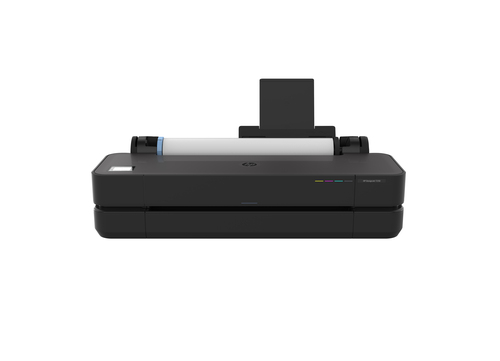
Exploring the Advanced Features of the HP DesignJet T250
When it comes to features, the HP DesignJet T250 shines brightly. This printer utilizes thermal inkjet technology—a method known for producing high-quality prints with a resolution of 2400 x 1200 DPI. Imagine the vibrant colors on your prints with such sharpness! You can confidently print in Black, Cyan, Magenta, and Yellow, bringing your designs to life in vivid detail.
Connectivity options offer flexibility, an often-cited necessity in modern workplaces. Whether you’re a fan of the reliable USB connection, require the reach of Ethernet LAN, or the convenience of Wi-Fi, this printer has you covered. The ability to integrate seamlessly into most work environments is certainly appealing. For further insights into how this printer fits into today's tech-driven workplaces, you might want to see how connectivity and integration play a big role. If you're curious about more intricate product details, check out detailed specifications. It’s always good to know what your printer is truly capable of!Maximizing Efficiency with Dynamic Security Features
Dynamic security in the HP DesignJet T250 is something that piques interest—it's like having an inbuilt shield ensuring optimized performance. It essentially means the printer is programmed to work best with cartridges that have newer or reused HP chip technology. This feature not only maintains performance but also opens up eco-friendlier printing options.
Firmware updates provide another layer of reassurance. The beauty of these updates is they often fix bugs, enhance functionality, and ensure your printer works optimally. Of course, there might be some hesitation about using non-HP cartridges due to compatibility issues, but the advantage here is in using reused, remanufactured, or refilled cartridges. Over time, this can provide significant savings in operational costs. If you’re keen to explore the economic and environmental benefits further, here’s a piece on dynamic security benefits. As with any technology, understanding these features can help you take full advantage of the printer’s capabilities, offering peace of mind while you print away.Benefits and Value Proposition for Different Industries
The application of the HP DesignJet T250 spans across various industries such as architecture, engineering, and design. In architecture, for instance, the need for precision and accuracy in blueprint printing is paramount, and that's where this printer excels. Its ability to produce large format prints that are both detailed and clear provides a competitive edge. The same applies to engineering firms that demand meticulous documentation.
Take, for example, Mycadprinting and Always printing companies—both have seen significant improvements in their operational efficiency due to the T250's seamless performance. Such glowing anecdotes are typical in industries where high-quality wide format printing is needed. If your business demands professional documents that stand out, then perhaps it’s time to consider the T250. The previously discussed real-world applications provide more insight into its capabilities. Plus, checking out the product details can help you determine if this model aligns with your specific industry needs.Enhancing Your Printing Practices
To truly maximize what the HP DesignJet T250 offers, a bit of savvy maintenance and best practices go a long way. One key tip is staying on top of regular maintenance—clean those nozzles, check for firmware updates, and you’ll fend off most common issues before they occur. You’d be surprised how far a simple routine can take you!
Another pro tip lies in using recommended supplies, like genuine HP cartridges, which optimize print quality and efficiency. Trust me, deviating from this might save a few bucks initially, but the inconsistency and clogs aren’t worth it in the long run. Maintenance is not just about avoiding issues; it’s about maintaining a level of excellence in your prints. Have a look at some printer maintenance tips, because a little know-how can significantly boost your print experience.HP DesignJet T250: An Experienced IT Professional's Review
In my honest opinion, the HP DesignJet T250 is a robust piece of equipment. It excels in delivering excellent print quality, which is crucial for design and architecture firms where every detail matters. The connectivity options are another plus, allowing seamless integration into existing tech setups.
However, there's a caveat with its dynamic security—it can be a bit particular with cartridges. This could pose a hurdle unless you stick to reused HP options, which still offer an eco-friendly and economical solution. From my experience, this printer is a reliable workhorse. If efficiency and quality are top on your list, this model should definitely be a consideration. You might also find these balanced review insights worth a read.How to Set Up and Get Started with Your HP DesignJet T250
Setting up the HP DesignJet T250 is often straightforward, but here’s a quick guide to help you out. Start by installing the ink cartridges—it’s usually as easy as lifting the lid, popping them in, and making sure they’re securely seated.
Next, tackle network connectivity. If you prefer going wireless, use the control panel to select your Wi-Fi network and enter the password, or simply plug in the Ethernet cable if it's nearby. Encountering connectivity errors is typical, so double-check your settings and restart the printer if needed—often, this fixes the issue. For those new to the T250, optimizing settings for specific tasks can make a world of difference. This guide on getting started can demystify the process. You’ll discover tips for settings tailored to blueprints or color prints, ensuring the best outcome for your projects.Conclusion
To recap, the HP DesignJet T250 is packed with features that make it a strong contender in the wide format printing market. From its high-resolution printing capabilities and dynamic security features to its industry-specific applications, it offers a substantial value proposition. Whether it’s the best choice for you can typically depend on your personal needs—if wide format printing with precision is on your agenda, this might just be the right pick.
I’d encourage potential users to delve deeper into product details before making a decision. It’s always best to align your specific requirements with what the printer offers. If it fits the bill, the T250 could very well be a worthwhile investment.Frequently Asked Questions
Common questions about HP Designjet T250 24-in Printer