
Why Choose the HP 730 130-ml Cyan Ink Cartridge for Your DesignJet Printer?
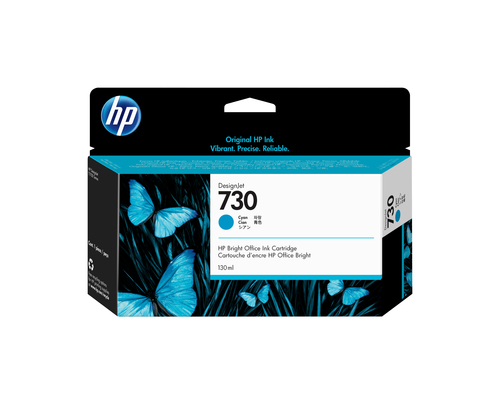
The HP 730 130-ml Cyan DesignJet Ink Cartridge emerges as a go-to choice for professionals who demand precision in printing GIS maps and technical documents. Its compatibility extends to plain papers and CAD, GIS media, ensuring every detail pops with vivid color and sharp lines—a crucial aspect of technical printing. With its OEM code P2V62A and manufactured in Singapore, this cartridge represents reliability. Discover more about its features, benefits, and applications as you explore this blog. For detailed specifications, visit our category page.
The Technical Edge: Inkjet Printing and Color Vibrancy
Inkjet printing technology has always been a step ahead when it comes to delivering sharp lines and bright colors. The HP 730 cartridge truly capitalizes on this with its ability to produce crisp designs, vital for those working with GIS maps or technical documents. It's fascinating how the cyan ink can make maps more readable, highlighting terrains and data effectively.
In my experience, working with vibrant prints isn't just about aesthetics; it often translates to clearer communication and better project outcomes. Have you ever printed a complex map full of colors and subtleties? You'd know the difference a high-quality ink can make! Furthermore, using cartridges like the HP 730 often results in longer printhead life, which in the long run, can save both time and money. There’s nothing more reassuring than knowing you're getting cost savings without compromising on quality. For those eager to dive into the specifics, the HP's official site offers detailed insights. And if you’re curious, more specs await at our category page.Seamless Performance and Fast Drying Time
When it comes to performance, the HP 730 cartridge doesn’t disappoint. It promises a workflow that’s as smooth as it is reliable. Imagine working on a tight deadline and not worrying about ink smudges; that’s the kind of reliability the HP 730 offers. The fast-drying feature not only keeps your prints smudge-free but speeds up project completion times—a gem in fast-paced work environments.
Have you ever noticed how some inks take ages to dry, forcing a delay in your project timeline? This is why the fast-drying ability is a game-changer. It enhances efficiency and keeps the momentum going strong. In environments where precision meets timelines, such as architecture or engineering firms, this feature is incredibly beneficial. Sometimes, troubleshooting minor hiccups might be necessary—and knowing some tips can be quite handy. Be sure to check out how it can transform your workflow at our category page. The jargon may get technical, but the efficiency improvements are palpable and worth exploring for anyone serious about seamless printing experiences.Maximizing Printhead Life for Cost Efficiency
One of the lesser-discussed aspects of choosing original HP inks, like the HP 730, is how it contributes to extending the lifespan of your printheads. Over time, this can significantly lower the overall cost of ownership—a crucial consideration for those frequently using CAD or GIS applications.
Quite often, non-original inks might seem enticing due to their lower upfront costs, but in the long run, they can wear out components more quickly. Anyone who’s managed IT infrastructure knows this conundrum: initial savings versus long-term costs. Industry trends continuously highlight the value of using original inks for optimal equipment performance, with a noticeable difference observed in printhead health. It's not just about costs either; there's a learning curve—a few hurdles for users transitioning from non-original to original inks. But hey, I've been there too, and trust me, the benefits outweigh the challenges. Curious about more product insights? Dive deeper at our category page.Real-World Applications and User Scenarios
So where does the HP 730 really shine? In sectors like architecture, engineering, and design, this cartridge becomes an integral part of daily operations. Professionals in these fields know the value of accuracy and reliability in technical printing.
Consider the architect who needs precise lines to interpret complex design plans. Or an engineer where even the slightest error can skew results. The cartridge enables exceptional precision, making it an industry favorite. But what if you couldn’t use this cyan ink? Are there alternatives? Sure, but with compromises. Many alternatives can’t compete with the clarity and dependability offered by the HP 730. Client testimonials often highlight how projects completed with this ink remain superior in quality, making a distinct impression in presentations and submissions. In a market increasingly demanding high-quality prints, this product remains a steadfast ally. Connect with more stories and scenarios by visiting our category page.Product Review: Pros and Cons
Evaluating the HP 730 Cyan Ink Cartridge reveals several compelling pros: vibrant color delivery, operational efficiency, and overall cost-effectiveness. In various settings, it performs reliably, making it a recommended option among professionals.
But every product has its challenges. For some, the initial cost may be a tad higher than generic alternatives—a factor to weigh if budget constraints loom large. Availability can be a hiccup depending on market demand but isn’t typically a long-term issue. User experiences often echo the sentiment of satisfaction, with a few expressing surprise at the notable difference in print quality. In my own forays into tech recommendations, it’s devices like these that often get top marks. Not convinced yet? Look further and entice reviews at our product page. This choice might just be what you've been looking for.How to Replace Your HP DesignJet Ink Cartridge
Replacing your DesignJet ink cartridge shouldn’t be daunting, even for the tech hesitant. Let’s break it down step by step. First, prepare by having a clean workspace and the necessary tools, like a clean cloth and gloves. Carefully unbox the new HP 730 cartridge—take a moment, breathe, no rush.
Next, power down your printer, open the cartridge door, and gently remove the depleted cartridge, placing it aside for recycling. Slide the new cartridge carefully into place, ensuring it locks securely. Best practices? Don’t force anything; gentle does it. Safety considerations matter, especially avoiding ink contact with skin, though it’s harmless. Often, people skip checking cartridge alignment, a common oversight leading to print issues, so take this extra time. Use these tips for achieving longer cartridge life and maintaining print quality. Replacements this smooth? They’re usually trouble-free when steps are closely followed.Conclusion
Wrapping up, the HP 730 Cyan Ink Cartridge stands out as a pivotal tool for technical printing, renowned for its color prowess and reliability. It consistently proves to be a top pick for professionals in fields like architecture, engineering, and design.
As technology propels forward, products like these remain indispensable, catering to the increasing exigency for quality and precision. Consider exploring this remarkable addition to your printing arsenal at our category page. It’s been my experience that such investments pay off significantly over time. Curious about where ink technology is heading next? Stay tuned as we delve into future topics on printer innovations and market trends.Frequently Asked Questions
Common questions about HP 730 130-ml Cyan DesignJet Ink Cartridge