
Is the HP 730 130-ml Cyan DesignJet Ink Cartridge Your Best Choice for Wide Format Printing?
Selecting the right ink cartridge can really make all the difference in your wide format printing, especially if you're in the realm of GIS maps or technical documents. The HP 730 130-ml Cyan DesignJet Ink Cartridge is a front-runner for those using CAD and GIS applications, offering impeccable sharp lines and vivid colors. Its fast-drying feature ensures smooth, hassle-free prints to keep your projects flowing seamlessly. For more details, visit product details.
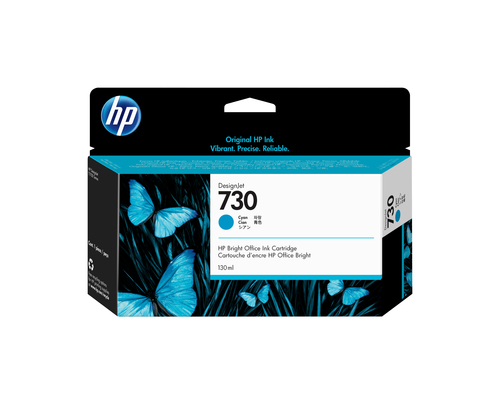
A Closer Look at Technical Specifications
The HP 730 Cyan Cartridge utilizes advanced inkjet printing technology paired with cyan coloring, marking it with the OEM code P2V62A. These traits are pivotal for delivering superior print outcomes, especially when the task involves intricate technical documents. The sharpness and color vibrancy are remarkable—a godsend for CAD users and GIS specialists who count on precision. In my past projects, cartridges like these have been invaluable in maintaining accuracy across large-scale prints and detailed depictions.
The HP 730’s ability to produce sharp lines and bright colors stems from its technical prowess. Its cyan hue is perfect for task-intensive environments where precise lines and clarity aren’t just desired; they're essential. The ink’s formulation minimizes print inconsistencies, which is something you don't always find in standard inks. When dealing with complex layouts or vivid colors, the difference is quite apparent. If you want to dive deeper into understanding technical ink specifications, check out our helpful article.Benefits: Maximizing Value and Performance
When you consider the HP 730, the value it brings to the table transcends just high-quality prints. Original HP inks, like the 730, are engineered to extend printhead life, providing economic benefits by reducing the need for frequent replacements—saving both time and money in hectic office environments. In fast-paced settings, its fast-drying properties can be a game-changer, boosting efficiency by cutting down on wait times.
It's not just about economics; it's about the ease and reliability of knowing you have a cartridge that works seamlessly every time, increasing your uptime. This translates to fewer maintenance tasks on your wide format printers and plotters, which in the long run, is a huge plus. Such benefits are pivotal in ensuring that large format printers run smoothly, consistently meeting the demands of high print volumes. For those interested in understanding how these benefits unfold, I highly recommend checking the detailed product benefits.Practical Applications and Use Cases
In the realm of blueprint production, large-scale graphics, and the precision of technical maps, the HP 730 undoubtedly makes its mark. Its suitability for CAD and GIS professionals who desire superior print caliber is unrivaled. Whether you're designing detailed architectural plans or mapping intricate geographic landscapes, this cartridge proves to be an essential tool.
I've often heard from users who swear by the HP 730 for daily use, praising its ability to consistently deliver results that meet their high standards. Brands such as HP DesignJet, Epson SureColor, and Canon imagePROGRAF work excellently with this cartridge, ensuring you don't have to worry about compatibility or performance hiccups. For a deeper dive into its technical prowess, you might want to read enhanced technical document printing insights with the HP 730.Troubleshooting and Alternative Options
While the HP 730 is highly effective, no product is without its potential challenges. Users sometimes question ink consumption rates or compatibility, especially with different printer models. However, many of these issues stem from proper setup rather than the cartridge itself. If you're experiencing higher usage rates, ensure your print settings are optimized for the task. Should problems persist, exploring alternative cartridges may be beneficial, particularly when specific printing needs or budgets dictate a different path.
Other cartridges might offer a less premium path but remember that efficiency and print quality of the 730 are hard to match—it's a notable benchmark in its category. An alternative could be suitable for less frequent printing tasks, albeit with compromises on speed or accuracy. To delve into comparisons or alternative options, head over to our dedicated comparison page.Product Review: Real-World Performance
In the field, the HP 730 Cyan Cartridge consistently impresses with its vibrant color reproduction and clarity across large documents—whether you're printing technical plans or color-rich graphics. Its vibrant hues and the sharpness of prints make it hard to overlook if you’re working within technical domains. Nonetheless, certain users might find its specialized focus on CAD and GIS documents somewhat restrictive for general office use.
User feedback points toward high reliability and consistent performance, though novice users may need a hands-on period to adjust. If you're looking for exceptional resolve in technical prints, the HP 730 proves unbeatable. However, should your needs pivot towards broader printing demands, exploring other models might be savvy. In essence, while not an all-rounder, it’s a standout where it counts.How to Install Your HP 730 Ink Cartridge
Installing your HP 730 cartridge in a DesignJet printer is straightforward—in my experience, it’s a quick job if you know the steps. Start by unboxing the cartridge care, ensuring the printer is ready—confirm it's powered on and the old cartridge, if present, is removed. Insert the cartridge into the designated slot, securing it gently but firmly.
Generous with tips, ensure you handle the cartridge by its edges to avoid ink spillage or sensor damage, as touching sensitive areas might void your warranty. Finally, double-check the secure fit by pressing it lightly into place, and close the printer cover. For those who prefer visual guidance, I’d highly recommend scrolling through the official guide which offers an excellent step-by-step tutorial.Conclusion
Choosing the HP 730 cartridge is often a no-brainer for professionals who appreciate its technical precision and robust efficiency. It’s more than just an ink cartridge—it’s a cornerstone for anyone routinely handling GIS maps and CAD applications, effectively cutting through high-volume tasks with cost efficiency in mind.
However, weighing your needs, whether dealing with multiple formats or piecing together large visual projects, is crucial in deciding if the HP 730 hits the nail on the head. To make a well-rounded decision, I’d encourage taking a closer look at detailed specs and user experiences through links at our place for detailed product insights and related explorative resources that might just answer those lingering questions. After all, the right choice can truly redefine your printing experience.Frequently Asked Questions
Common questions about HP 730 130-ml Cyan DesignJet Ink Cartridge