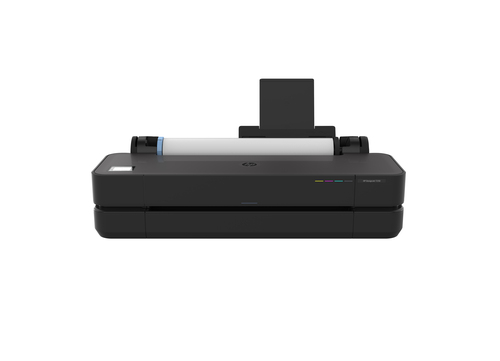
Is the HP Designjet T250 Your Ideal Large Format Printer?
Introducing the HP Designjet T250, a top-tier large format printer that's perfect for blueprints, CAD designs, and posters. Boasting dynamic security features, impressive technical specs, and compatibility with reused HP chips, this printer fits seamlessly into the modern workflow. Dive deeper into how it aligns with your printing demands and see the HP DesignJet T250 product details for more insights.
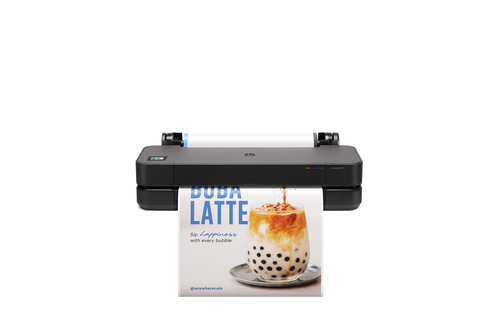
Top Features of the HP Designjet T250
The HP Designjet T250 offers a remarkable 2400 x 1200 DPI resolution, ensuring that every print is crisp and clear, whether it’s a detailed CAD drawing or a vibrant poster. Leveraging Thermal Inkjet technology, it achieves professional-quality prints with ease. You’ll be impressed by the accuracy and vividness of the four-color system—Black, Cyan, Magenta, and Yellow—offered by this printer.
It's often said that connectivity can make or break a device. Well, the T250 doesn’t disappoint. With flexible connectivity options like USB, Ethernet LAN, and Wi-Fi, this printer integrates smoothly into various environments, allowing you to choose the best option for your setup. Got a tech-savvy office? You're covered. Tackling technical issues is easier with the HP Designjet T250, thanks to its dynamic security features that ensure genuine cartridge authenticity—no more surprises with faulty prints. To explore more about the key features of the HP Designjet T250, you'll find it hard not to be impressed by its multifaceted capabilities. In my experience, the peace of mind knowing your cartridges are authentic is invaluable.Value Propositions and Benefits
For industries like architecture and engineering, where precision is paramount, the benefits of the HP Designjet T250 can't be overstated. This wide-format printer is typically indispensable for blueprint printing needs.
Cost-effectiveness is another significant advantage. Businesses requiring frequent large, detailed printouts will find the investment in a Designjet T250 well worth it. Regular firmware updates ensure HP cartridge quality and reduce downtime, a feature beneficial for maintaining efficiency. If you're curious about how this aligns with innovative printing solutions, you'll see the T250 is a reliable choice. Another remarkable benefit is its eco-friendliness. The use of remanufactured cartridges not only lowers costs but also minimizes environmental impact—a consideration more firms are emphasizing now. In my view, this combination of quality, reliability, and sustainability is a game-changer for any business involved in high-volume printing.Real-World Applications and Practical Use Cases
Imagine you're working with architectural designs or engineering blueprints that require meticulous attention to detail. The HP Designjet T250 excels in such scenarios, offering clear and detailed output. It’s also perfect for colorful marketing materials—ideal for print shops offering same-day services.
Many businesses prioritize speed and efficiency in their processes. With its plotting capabilities, the T250 supports both internal projects and external service offerings, such as those utilizing Mycadprinting services. Typically, firms leverage this investment to significantly improve project turnaround times without compromising on quality—ensuring that deadlines aren’t just met, but often exceeded. Finally, what I find particularly compelling is the ability of the T250 to cater to diverse needs without a hitch. It's truly a versatile asset for businesses needing dependable performance. Want to know how it can fit your business needs? Explore the HP DesignJet T250 product details to see if it’s the right fit for your enterprise.Understanding Dynamic Security Features
Dynamic security is a standout feature for the HP Designjet T250, addressing a common concern among businesses—authenticity of printing components. This mechanism ensures that only genuine HP chips work seamlessly with your printer, minimizing issues known to arise from incompatible cartridges.
Regular updates bolster this security, maintaining optimal performance and ensuring reliability is never compromised. From my many discussions with industry peers about printer repair, dynamic security features have increasingly become a focal point—people want reassurance that their investment will continue to deliver. If you're interested in a balanced review of the HP DesignJet T250, you'll find detailed insights that highlight both strengths and areas where this functionality truly shines. When properly managed, dynamic security mitigates potential pitfalls—in my view, addressing these with comprehensive maintenance strategies is essential for optimal long-term functioning. This feature mitigates the potential headaches from cartridge failures, allowing your focus to remain where it should—on your business priorities.Product Review: Pros, Cons, and Recommendations
With outstanding print quality, the HP Designjet T250 stands out easily, offering reliability and versatility in connectivity options as significant pros. But there's a catch—being limited to HP-regulated cartridges might be a concern for some, both in cost and flexibility. For practical use in CAD services and frequent large format printing, it is superbly convenient.
I’d recommend this printer for CAD designers after efficiency and consistent quality. Dive into valuable CAD printing services to see how the T250 enriches your work stream. In my opinion—looking past its cartridge restriction—it remains a top contender in its segment.Setting Up Your HP Designjet T250
When setting up your HP Designjet T250, you'll find connecting it via Ethernet, USB, or Wi-Fi straightforward. Ensuring that the right connections are established from the start prevents unnecessary headaches later.
Another tip? Take care when aligning the cartridges initially—it’s a simple step but often overlooked, affecting print quality if done incorrectly. Configuring print settings according to your desired paper sizes is essential, too. I've seen common pitfalls like incorrect port setups impacting connectivity—avoid these with a double-check. Pro Tip: Frequent firmware updates are your best friend, ensuring robust dynamic security and smooth operation. From personal experience, simplifying the printer's user interface for newcomers can significantly enhance their experience, making a previously daunting setup process surprisingly user-friendly.Conclusion
Highlighting key advantages of the HP Designjet T250—its superior print quality, robust security features, and flexible connectivity options—it's hard not to see its appeal. This printer meets the multifaceted needs of professionals from architects to marketers with ease.
As you consider adding it to your arsenal of business tools, think about how it can uplift productivity and efficiency in your operations. Considering it for your diverse printing needs might be your next step. Don’t miss out on exploring its full potential—check out the product details to understand how it uniquely fits into your work environment. Curious to see how it compares to previous models or competitors? Our exploration of product features offers deeper insights into finding your ideal match for your business demands.Frequently Asked Questions
Common questions about HP Designjet T250 24-in Printer