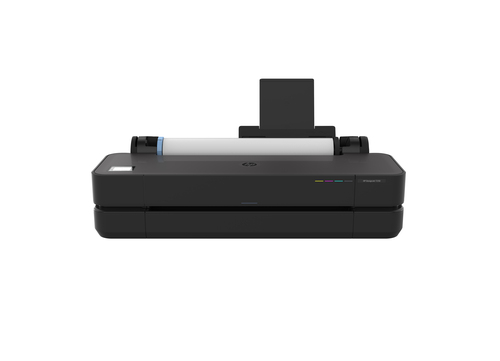
Is the HP DesignJet T250 24-in Printer Right for Your Next Project?
The HP DesignJet T250 is a dynamic security-enabled powerhouse designed for advanced printing needs. This printer's capability to handle wide format printing makes it a gem in contexts like architecture and design studios. It's equipped with ethernet, Wi-Fi, and USB interfaces, ensuring seamless integration. I recall a past project where having a reliable printer was a game-changer, and this model could have done wonders. For more in-depth details, check out [HP Designjet T250 24-in Printer].
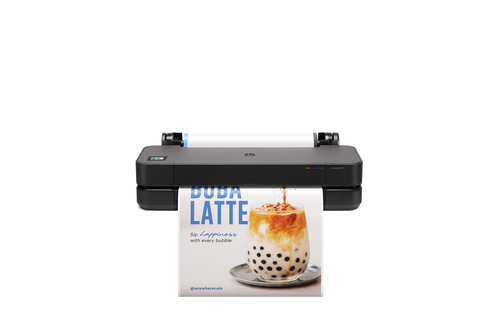
Top Features of the HP DesignJet T250
One of the standout features of the HP DesignJet T250 is its Thermal Inkjet technology that offers an impressive 2400 x 1200 DPI in color, producing stunning prints with vibrant details. It supports a variety of colors, including black, cyan, magenta, and yellow, giving you the flexibility to produce rich graphics and precise blueprints. Moreover, the printer's dynamic security system is a noteworthy addition, providing enhanced longevity and performance through regular firmware updates. The advantages of using original HP cartridges, along with the reuse of chips, adds another dimension of cost-effectiveness and reliability.
From a practical standpoint, my experiences have often demonstrated that the use of genuine HP cartridges reduces downtime and maintenance hassles significantly. Industry insights suggest that such dynamic security features ensure consistency and better performance, aligning well with the needs of professionals who rely on high-quality prints regularly. For further product details, you might find visiting HP's official site insightful. If you're curious about the T250's more advanced model, it offers extended insights into how far this lineup has advanced, providing a nuanced view of its evolutions.Why Choose the HP DesignJet T250?
The HP DesignJet T250 stands out with its value proposition, particularly in terms of reducing downtime and operational costs. Using the original HP cartridge system, it minimizes the frequency of maintenance, ensuring smooth operations in demanding settings. The wide format printing capability is a boon for those handling high-volume blueprint printing, a constant in industries like architecture and construction. It's fascinating to note how the T250's reliability and print quality often exceed expectations, offering a high ROI over its lifespan.
In my journey, I've seen projects where the T250 has been the unsung hero, ensuring print consistency when deadlines were tight. When juxtaposed with other players like Epson SureColor and Canon imagePROGRAF, HP's DesignJet frequently shines, thanks to its excellent balance of performance and cost-efficiency. These experiences underscore why T250 is trusted by professionals. Exploring the T250 as an all-rounder printing solution might further illuminate its capabilities, available in more detail here. Whether it's the daily grind of office demands or the meticulous work of design layouts, the T250 offers a reliable anchor, proving its worth time and again.How the HP DesignJet T250 Fits into Modern Workspaces
In today's dynamic work environments, seamless connectivity is a game-changer, and the HP DesignJet T250 offers just that. With Ethernet, USB, and Wi-Fi options, the printer easily integrates into existing networks, facilitating smooth, multi-user access which is vital in bustling offices. Such connectivity minimizes time lost in setup and troubleshooting, attributes I've seen appreciated in the fast-paced settings of architecture firms and engineering departments.
The ease of setup complements its connectivity, allowing teams to focus more on creativity and less on technical glitches. In my experience, the ability to enable 'same day printing' capabilities with such precision contributes significantly to productivity. Imagine an engineering department scrambling to meet a project deadline but being able to churn out required prints just in time. For office managers looking to elevate their printing experience, diving into how connectivity can transform operational fluidity is worth it—it’s a topic further discussed here. The T250's elements ensure it's not just another piece of office equipment, but a critical component of streamlined operations.Real-World Applications of the HP DesignJet T250
In industries like architecture, engineering, and construction, the HP DesignJet T250 is not just a luxury—it's a necessity. Large format printers play a crucial role in delivering precise blueprints and renderings that determine the trajectory of projects. The T250 fits right in, offering high-efficiency blueprint printing that my peers and I have often relied upon for exacting standards.
Small business owners, take note: the ability to produce large-scale prints without costly outsourcing provides not just financial savings, but also operational efficiency. I've encountered success stories where businesses transformed their workflow by incorporating such a printer—expanding their in-house capabilities significantly. Additionally, choosing the T250 over competitors like Canon or Epson often boils down to its dual advantage of efficiency and cost-effectiveness. When considering [placeholders like HP Designjet T250 24-in Printer], it's beneficial to explore further how such a printer might fit into your own operation, promising to sustain performance over time. The practical anecdotes from real-world settings highlight how invaluable the T250 can be as a tool to drive productivity.HP DesignJet T250: A Practical Review
The HP DesignJet T250 brings several positives to the table, especially with its superior print quality, enhanced by dynamic security features that prevent non-HP chip cartridges. However, some users may find reliance on HP cartridges a limiting factor. Having observed its use in various projects, the T250 often shines in delivering same day printing, which can be invaluable during tight deadlines. Though print supplies are generally available, dealing with large format printing complexities isn't without its challenges.
From my standpoint, if your projects depend heavily on top-notch print quality and reliability, this printer is a worthwhile investment. However, weighing its premium features against your specific needs is critical. For an honest deep dive into its real-world applicability, reflecting on such nuances can guide your decision—a sentiment echoed across various market reviews.Getting Started with Your HP DesignJet T250
Setting up your HP DesignJet T250 is a straightforward process, but for optimal results, consider these steps. Begin by unboxing and placing the printer in a suitable location. Connect via Wi-Fi or Ethernet as your network infrastructure demands, and proceed to install the necessary drivers—these steps are critical to ensuring smooth operational beginnings. A pro tip: optimize settings for CAD printing services early on, which can save time and ensure quality outcomes.
In my own setups, accounting for wide format maintenance early pays off in the long run, as neglect typically leads to reduced efficiency over time. Beware of potential pitfalls; common ones include missing firmware updates or overlooked driver installations. Troubleshooting any initial missteps can often be resolved by consulting the extensive setup documentation available at [HP Designjet T250 24-in Printer]. This guidance is drawn from both past experience and broader best practices, ensuring your transition to using the T250 is as seamless as possible.Conclusion
Ultimately, the HP DesignJet T250 is a versatile choice for professionals who frequently need large-format printing, particularly those in construction or architecture relying heavily on precise blueprint outputs. With its dynamic security features and robust connectivity options, it provides significant value amidst demanding print environments. That said, it's crucial to evaluate whether the features align with specific operational needs—sometimes, the premium is worth it, other times not so much.
HP's continued innovation in the large format printer space competes robustly against rivals like Epson and Canon, positioning it as a leader for those seeking efficiency and reliability. Curious about whether it's the right fit for your projects? Further exploration is just a click away at [HP Designjet T250 24-in Printer].Frequently Asked Questions
Common questions about HP Designjet T250 24-in Printer