
How the HP 730 Cyan Cartridge Transforms Your Design Prints
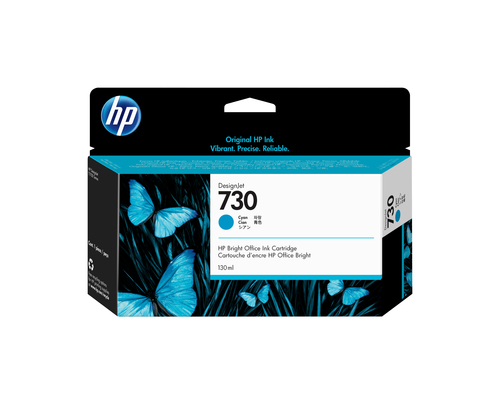
The HP 730 130-ml Cyan DesignJet Ink Cartridge isn't just another ink product—it's a game-changer for quality prints, especially if you're into CAD, GIS, or wide format printing. Not only does it ensure bright colors and sharp lines crucial for technical prints, but it also teases a drama-free, cost-effective experience. If you're still curious, check out our guide on choosing the right ink cartridge for your HP DesignJet printer and dive deeper into ink brilliance.
Enhance Your Technical Documents with Vivid Colors
In the world of design, color accuracy can make or break your project. The HP 730 Cyan Cartridge excels in delivering vibrant reproductions, which is crucial for GIS maps and detailed CAD drawings. Think about it—when architects plan an urban blueprint, every hue translates into crucial data points. In my experience, ensuring those colors pop not only impresses clients but also aids in decision-making.
Now, how often have you been stuck with unsatisfactory prints that bleed or smudge? The inkjet technology in this cartridge guarantees consistency, without the tell-tale bleeding marks, even on basic paper. You might find this particularly beneficial when presenting drafts in a professional setting. It's like the difference between a standard television and a high-definition screen; the impact is noticeable. And let's not forget those instances where high-quality ink made a difference on non-glossy media sheets. The advantage isn't just visual—it's about presenting your hard work in the best light. Colors communicate ideas, and with the maximize color vibrancy this ink offers, your designs will stand out, helping to convey your project's true intent at a glance.Seamless Printing Experience Every Time
We've all been there—midway through a crucial print job, and your printer decides it's time for a tantrum. But with the HP 730 Cyan, those interruptions might become a thing of the past. This cartridge boasts a track record for reliability that often keeps your printing routine smooth and hassle-free. Imagine an engineering firm, tight deadlines looming, needing swift printouts; the quick-drying ink here is a lifesaver.
One of my printer nightmares involved a paper jam that ruined hours of work. But with the OEM design of the HP 730 (P2V62A), these episodes are thankfully rarer. Its alignment with the printer’s mechanics often means fewer hiccups—perfect if you’re ever engaged in same day printer maintenance workflows. Besides, remember those heart-stopping moments when you’re unsure if the print output will be as expected? With this cartridge, predictable performance is typically on the cards, easing that pressure. It’s about peace of mind, knowing the vibrant cyan consistently meets your expectations without misfires.Cost Efficiency and Mechanical Longevity
Let’s talk money—and no, not the upfront costs that might make you cringe. Over time, using the HP 730 Cyan Cartridge could actually mean more savings. How? Well, it extends the life of your printhead, which in turn reduces overall maintenance expenses. Just imagine a sturdy car engine running longer with premium oil—it’s that kind of efficiency.
Now, if you've ever dabbled with generic alternatives, you may know the mechanical compromises they can entail. The construction quality from Singapore is expected to offer superior performance without premature breakdowns, translating to less downtime with your hardware. Budget choices are tempting, and I get it; we all want to save a buck. But usually, the pennies saved could mean dollars lost on repairs. Investing in quality ink, like the HP 730, is akin to making small yet smart moves toward long-term savings. Interested in seeing how this balance plays out? Check the product details page for insights into performance and cost efficiency.Perfect for a Range of Printing Applications
Feeling versatile? Well, the HP 730 Cyan Cartridge certainly is! It’s not just about technical documents; it stretches across a variety of applications. Whether it's architectural blueprints, GIS maps, or vibrant posters, this cartridge steps up. Consider a bustling office needing precise large-format blueprints for an urgent client meeting. This is where the HP 730 shines.
In practical terms, it’s used beyond just HP DesignJet printers. Its compatibility with similar plotters boosts its utility, so those in different environments can still enjoy premium ink quality. You know what's exciting? You’re not confined to cliché printer tasks. Explore different scenarios—be it printing a major company project on deadline or exploring artistic ventures on vast canvases. When contemplating print supplies, it's worth checking similar print supplies that complement this cartridge's prowess, fueling more creative and functional outcomes.Honest Review: Pros and Cons of the HP 730 Cyan Cartridge
Let’s break it down—this cartridge has its share of highs and lows. On the bright side, its color reproduction and quick-drying ink make it stand out. There's a seamless performance that aligns with high-stakes projects like complex CAD and GIS work.
Yet, it isn’t all sunshine. High initial costs could deter first-timers, and unfortunately, possible non-compatibility with non-HP printers could limit its use. In real-world scenarios, if you're working on multidisciplinary projects needing both vibrancy and precision, this cartridge often emphasizes the positives. When should you indulge in the HP 730? Large-scale projects demanding faultless color accuracy and efficiency? It’s a no-brainer. Just weigh these pros against your own needs before diving in.How to Replace Your HP DesignJet Ink Cartridge
Ready to replace your HP 730 Cyan Cartridge? Here's how. Start by ensuring your printer's off for safety. Open the cartridge door located at the side. Gently remove the old cartridge by pulling it outward. Align the new cartridge with the slot, pressing it until you hear a click—confirming it's secure.
Ah, don’t rush back to printing! Perform a printhead alignment check post-installation—it ensures everything's in tune. Common issue? Occasionally, cartridges won’t register immediately. Just re-check if they're seated properly. Pro tip: Store extra cartridges in a cool, dry place. Extreme conditions can affect ink quality. For a visual guide, see our step-by-step guide on this procedure.Conclusion
To wrap it up, the HP 730 Cyan Cartridge is a solid partner for vivid color reproduction and mechanical efficiency in your printing endeavors. Whether it’s wide or large format prints, or saving on long-term costs, the benefits are clear. Premium isn't always practical for everyone, but in this case, long-term advantages often outweigh fleeting allure of low-cost alternatives. Have you tried it yet? We'd love to hear how it transformed your printing landscape.
Curious for more options? View more print supplies and make a choice that aligns with your needs, both practically and economically.Frequently Asked Questions
Common questions about HP 730 130-ml Cyan DesignJet Ink Cartridge